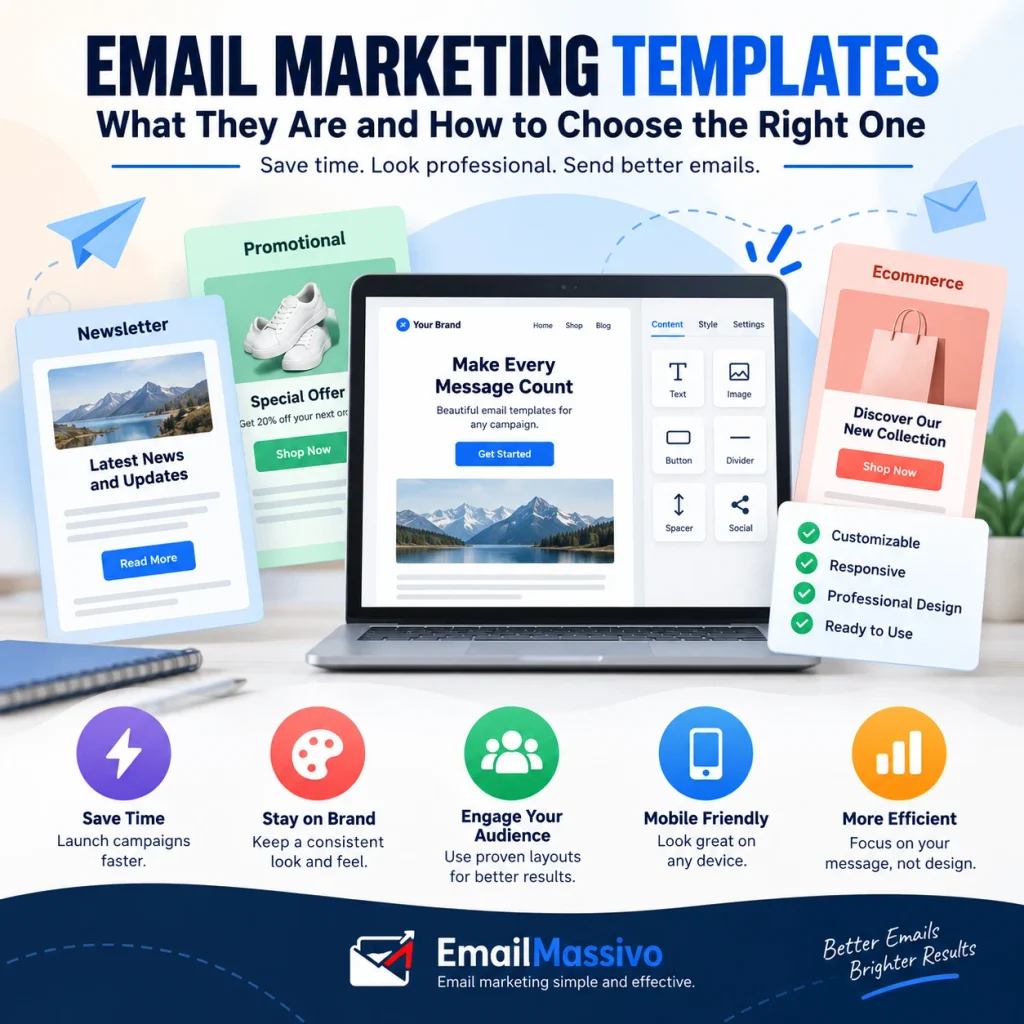
Choose an email layout after deciding what the reader needs to do. A newsletter with several useful articles needs a different structure from a single-offer promotion or a product collection. Starting with that decision makes the template library easier to navigate—and helps you avoid filling attractive blocks with content that does not belong in the campaign.
Quick Answer
Email marketing templates are reusable structures for messages such as newsletters, promotions, and product updates. They organize headings, text, images, buttons, and footer information, while leaving campaign-specific content to the sender. Choose a template around one main objective, the amount of information readers need, and the next action you want them to take. Then customize the design and test the finished email across relevant devices and email applications.
What Is an Email Marketing Template?
An email marketing template is a reusable layout that provides a starting structure for marketing messages. It may contain fixed design elements, editable content areas, or reusable blocks, depending on the format and editor.
A template is not a complete campaign. It does not decide who should receive the message, whether they expect it, or when it should be sent.
| Term | What it means | Example |
|---|---|---|
| Template | The reusable structure and design | A layout with a headline, product section, button, and footer |
| Campaign | The objective, audience, content, settings, and sending plan | A product launch message for existing subscribers |
| Sent email | The message delivered to an individual recipient | The populated layout with final links and recipient-specific details |
Before sending, you still need to supply accurate content, choose recipients, configure the sender, and check the result. Even a previously tested template needs another review after substantial changes.
Why Use Email Marketing Templates?
Templates reduce the number of layout decisions you need to repeat. Instead of rebuilding the header, spacing, and footer for each campaign, you can concentrate on the message.
Practical benefits include:
- Faster preparation: reuse an established structure instead of designing every section again.
- Consistent branding: carry approved colors, logo placement, and visual styles across messages.
- Repeatable layouts: give recurring content a predictable home.
- Less routine design work: adapt existing blocks when they already fit the content.
- Clearer collaboration: let writers and reviewers work within agreed content areas.
- A mobile-ready starting point: reuse responsive behavior that has been checked, while testing your changes.
- More focused iteration: change a headline or CTA without redesigning the entire email.
For example, a recurring newsletter can keep its lead-story layout while changing the articles. That gives the team a stable production format.
These are workflow advantages, not promises of higher open rates or conversions. A template cannot make an irrelevant offer useful or replace a well-maintained subscriber list.
Main Types of Email Marketing Templates
Email templates can be grouped by the job the message performs. These categories overlap: a product launch may be both an announcement and an ecommerce email.
| Template type | Main purpose | Typical content |
|---|---|---|
| Newsletter | Maintain regular communication | News, articles, updates, selected resources |
| Promotional | Present an offer or encourage an action | Offer details, supporting copy, primary CTA |
| Ecommerce | Showcase products or support a purchase decision | Product images, descriptions, prices, product links |
| Welcome | Introduce the brand or subscription | Greeting, value proposition, expectations, next step |
| Announcement | Explain something new or changed | Product launch, company update, relevant details |
| Event | Invite readers to attend | Date, time, location or access details, registration |
| Transactional | Confirm or support a specific action | Order details, account information, confirmation |
Transactional email is not the same as a bulk marketing campaign. A purchase receipt or password reset responds to a specific transaction or request, even though it uses a reusable layout. Google makes this distinction in its email subscription guidelines.
Do not classify a message solely by its appearance. A branded receipt and a sales promotion may share colors and typography while serving different purposes.
Newsletter Email Templates
Newsletter email templates organize recurring information into a readable sequence. They suit messages with several related items rather than one offer that dominates the entire email.
Look for a clear lead section, short content summaries, and supporting blocks that remain easy to scan. Secondary links can help readers choose the topic they want without making every article equally prominent.
An illustrative structure might be:
- A brief introduction explaining this edition’s focus.
- One lead story with its own link.
- Two shorter updates.
- A footer with sender information and subscription controls.
Choose the layout around the actual content. If an edition contains one substantial update, remove unused sections instead of inventing extra stories to fill the design.
Promotional Email Templates
Promotional email templates put an offer and its next step at the center of the message. The reader should be able to identify what is available, why it is relevant, and what the button will do.
Choose a layout with room for the essential terms beside the offer. Include a discount, deadline, or availability statement only when it is accurate.
One primary CTA does not necessarily mean one button. A longer email can repeat the same action after additional explanation. The problem is competing priorities: asking readers to shop, register, download, and complete a survey in the same short promotion.
Match the button to the destination. “View the collection” should open the relevant collection, not a general page that makes readers search again.
Ecommerce Email Templates
Ecommerce email templates combine product visuals with the information needed to evaluate or explore an item.
Check whether each product block can accommodate:
- An image that shows the product clearly.
- A readable product name.
- A short, useful description.
- Accurate pricing or offer information, when included.
- A link to the correct product or collection.
Use the email to support a decision, not reproduce an entire catalog. A focused selection leaves more room to explain why those products belong together.
Product grids also need a mobile check. When columns stack, each description and button should remain connected to the correct image. Review the email with real product names: a layout that works with a short placeholder may become awkward with longer titles.
How to Choose the Right Email Template
Choose an email template by matching its structure to the campaign objective, primary action, content volume, audience, and reading conditions. Evaluate the layout with real copy before committing to it.
1. Define the campaign goal
Write one sentence describing the purpose: announce a service change, share useful articles, or introduce a product collection.
Avoid objectives such as “send something attractive.” They do not help you choose between layouts.
2. Identify the primary CTA
Decide what the reader should do next. The answer determines how much supporting information the email needs and where the main action belongs.
For an informational update, the next step may simply be reading the explanation.
3. Determine how much content is needed
List the required sections before browsing designs. Distinguish essential information from material that can sit on the destination page.
A short promotion should not inherit six sections merely because the preview includes them.
4. Consider the audience
Ask what recipients already know. New subscribers may need an introduction; existing customers may need a concise explanation of what has changed.
Choose language, imagery, and information depth for those readers rather than copying the template’s demonstration content.
5. Check mobile behavior
Inspect text, images, buttons, and the reading order at a narrow width. Make sure the layout does not depend on side-by-side content remaining side by side.
6. Match the template to the brand
Assess how much adaptation is needed. A design that requires replacing most of its structure may be a poor starting point, even if its preview looks appealing.
7. Remove unnecessary blocks
Delete sections that do not support the goal. Check the spacing afterward so the remaining message does not contain unexplained gaps.
8. Test before sending
Review the populated email, not just the original template. Real copy, personalization, and destination links can reveal issues that a polished preview hides.
What Makes a Good Email Template?
A good email template makes the message understandable and its next step easy to find. Visual polish helps only when the structure supports the content.
| Criterion | What to inspect |
|---|---|
| Visual hierarchy | Can readers distinguish the main message from supporting details? |
| Typography | Is the text readable without shrinking important information? |
| Responsive layout | Does the reading order remain logical at different widths? |
| CTA | Does the label explain the action and match its destination? |
| Spacing | Are sections distinct and interactive elements sufficiently separated? |
| Preheader | Does the preview text complement the subject rather than repeat it? |
| Images and text | Is essential information available as text, not only inside graphics? |
| Accessibility | Are image alternatives, contrast, and link descriptions considered? |
| Sender identity | Is it clear which organization is communicating? |
| Unsubscribe | Is there a visible, functioning way to stop marketing messages? |
The preheader is the short preview text that may appear alongside the subject in an inbox. Review it as part of campaign preparation, whether it is configured in the editor or supplied within the email.
For images, follow purpose rather than a blanket rule. W3C recommends meaningful text alternatives for informative images, action-oriented alternatives for image links, and empty alternatives for purely decorative images. See its image accessibility guidance.
A visible unsubscribe link is separate from technical one-click unsubscribe support. RFC 8058 describes the header-based mechanism; adding a footer link alone does not implement it.
Responsive Email Templates and Mobile Devices
Responsive email templates adapt their layout to different viewing widths. The goal is to preserve readable content and usable actions, rather than shrink a desktop composition until it fits.
When reviewing a template, check that:
- The layout fits without horizontal scrolling.
- Text remains readable.
- Buttons can be selected without accidentally touching adjacent links.
- Images resize without distorting or hiding essential detail.
- Stacked columns preserve a sensible reading sequence.
A simple single-column layout is a useful starting point for a focused message. Multiple columns can suit product selections, but inspect what happens when they stack.
Do not treat “responsive” as a guarantee of identical appearance everywhere. Test the finished email in the email applications relevant to your audience. Where dark mode matters, inspect logo visibility, text contrast, and button labels in that mode too.
Should You Build an Email From Scratch or Use a Template?
Use a template when an existing structure fits a recurring communication need. Build from scratch when the project requires a layout or behavior that available templates cannot reasonably support.
The following comparison assumes the chosen template is suitable and editable in your sending workflow.
| Consideration | Suitable template | Built from scratch |
|---|---|---|
| Initial setup | Usually less layout work | Requires creating the structure |
| Flexibility | Limited by editable elements and implementation | Greater control, within email-client constraints |
| Design expertise | Less needed for routine changes | More design and email-development knowledge needed |
| Consistency | Easier to preserve with an approved base | Depends on reusable components and documentation |
| Testing | Still required after customization | Required for the new structure and content |
| Best fit | Repeated newsletters, offers, and updates | Specialized layouts or tightly specified projects |
A custom build is not unlimited: it still has to work in recipients’ email software.
For recurring campaigns, compare the editing effort rather than simply counting available designs. If adapting a template repeatedly takes longer than maintaining a purpose-built layout, creating your own reusable base may be worthwhile.
How Much Should You Customize an Email Template?
Customize everything that identifies the sender, explains the message, or controls the reader’s next action. Preserve structural elements only when they still serve the campaign.
Replace or review:
- Logo and brand colors.
- Typography where the editor and email clients support it.
- Images and their text alternatives.
- Headings, body copy, and product information.
- CTA labels and destinations.
- Footer and company details.
- Personalization fields and fallback text.
- Subscription links and campaign-specific terms.
Remove sample testimonials, invented product claims, demonstration discounts, and generic placeholder copy. Their presence in a template is not evidence that they apply to your business.
Keep a clean master separate from campaign-specific versions. Before reusing an old campaign, check its dates, pricing, links, and audience references rather than assuming the content remains current.
Common Email Template Mistakes
The most useful review question is not “Does this look professional?” but “What could confuse or block the reader?”
| Mistake | What to change |
|---|---|
| Choosing by appearance alone | Match the structure to the campaign goal first |
| Too many competing CTAs | Establish a primary action and subordinate the others |
| Excessive text | Keep decision-critical information; move supporting detail where appropriate |
| Image-only content | Provide the core message and action as readable text |
| Poor mobile layout | Check stacking, width, and touch interaction |
| Tiny text | Simplify the content instead of compressing it |
| Misleading buttons | Make the label accurately describe the destination |
| Missing image alternatives | Describe informative content or function; leave decorative alternatives empty |
| Placeholder copy or links | Replace and inspect every editable element |
| Untested destinations | Open links in the received test message |
| Missing unsubscribe mechanism | Verify the visible link and applicable sending-system support |
| Unadapted sample content | Rewrite for the actual audience and offer |
There is no need to force a fixed image-to-text ratio. Instead, check whether the email remains understandable when images are unavailable and whether the visuals contribute useful information.
How to Test an Email Template Before Sending
Send a test after adding final content. An editor preview is useful, but it does not replace inspecting a received message.
Follow this review sequence:
- Subject: does it accurately describe the message?
- Preheader: does it add context without exposing placeholder text?
- Sender: are the display name, sending address, and reply address appropriate?
- Links: do navigation, product, image, and footer links reach the intended pages?
- CTA: is the action visible, understandable, and usable?
- Images: do they load, scale, and show the correct content?
- Alt text: does it describe the image’s information or function where needed?
- Desktop: are alignment, spacing, and content order intact?
- Mobile: can the email be read and used without awkward zooming or scrolling?
- Dark mode: where relevant, are text, logos, and buttons still legible?
- Personalization: do populated fields and missing-value fallbacks work?
- Unsubscribe: does the recipient-facing process work?
- Final test send: have you checked the latest version after corrections?
Use controlled test contacts for personalization and unsubscribe checks so you do not unintentionally change a real subscriber’s status.
Separate design testing from delivery checks
A successful visual test does not establish inbox placement. Email deliverability also involves the sending domain, infrastructure, audience, and sending practices.
Review SPF, DKIM, and DMARC separately from the layout. Google’s sender guidelines describe authentication requirements and require qualifying bulk senders to support one-click unsubscribe for marketing and subscribed messages, alongside a visible body link.
Also monitor sender reputation and recipient complaints. If messages fail delivery, investigate the response rather than redesigning first; the distinction between hard and soft bounces helps frame that investigation.
If messages arrive in spam, use the broader troubleshooting guide, Why Are My Emails Going to Spam?. A different template is not a universal remedy.
Using EmailMassivo Email Templates
The Email Marketing Templates library gives you a starting point for browsing designs by message type. Relevant categories include Ecommerce, Newsletter, and Promotional.
Start with the category closest to your objective:
- Newsletter: evaluate the hierarchy of stories and supporting updates.
- Promotional: look for a focused offer area and clear primary action.
- Ecommerce: inspect product presentation and the relationship between images, details, and links.
Compare a small selection using the same content outline. This makes it easier to see which layout fits without adding unnecessary sections.
After choosing, replace the demonstration content, check your brand details, and test the populated email. The library helps with selecting a structure; the campaign still needs an appropriate audience, accurate message, and sending checks.
Email Template Selection Checklist
Before committing to an email marketing template, confirm that:
- The layout supports a defined campaign goal.
- The primary CTA has a clear place.
- Required content fits without overcrowding.
- Optional blocks can be removed.
- The design can represent your brand.
- The mobile reading order makes sense.
- Essential information is not restricted to images.
- The footer accommodates sender details and unsubscribe.
- The template works in your editing workflow.
- The finished email can be tested before sending.
FAQ
An email marketing template is a reusable structure for marketing messages. It supplies the layout while the sender adds campaign-specific content, links, branding, and recipient information.
The template is the layout; the campaign includes the objective, audience, message, sending settings, and timing. One template can support several campaigns.
Common types include newsletter, promotional, ecommerce, welcome, announcement, event, and transactional templates. Transactional messages serve a different purpose from bulk marketing, even when they share visual elements.
Responsive templates are a sensible starting point when recipients may read on different devices. Test the customized email rather than relying only on its responsive label.
Usually, but the available changes depend on the template and editor. Check support for editing content, images, colors, buttons, and structural blocks before choosing.
Use a suitable template for repeatable campaigns; consider a custom build for requirements existing layouts cannot accommodate. Both approaches need testing.
It should accommodate a clear message, recognizable sender, readable content, an appropriate next step, and a working unsubscribe option. Campaign preparation should also include a subject line and useful preheader.
Only if its structure fits each message. A reusable brand foundation is helpful, but a newsletter, product promotion, and event invitation may need different content arrangements.
Content and formatting can contribute to delivery problems, but a template does not guarantee inbox placement. Authentication, sender reputation, list quality, complaints, and sending behavior also matter.
You can browse EmailMassivo’s template library, including Ecommerce, Newsletter, and Promotional categories. Choose by message purpose, then assess the design with your own content.
Key Takeaways
- Choose the campaign goal before the layout.
- Treat a template as a starting structure, not a finished campaign.
- Match the template type to the message and primary action.
- Replace placeholders and remove unnecessary blocks.
- Test real content on relevant devices and email applications.
- Check deliverability separately from visual design.