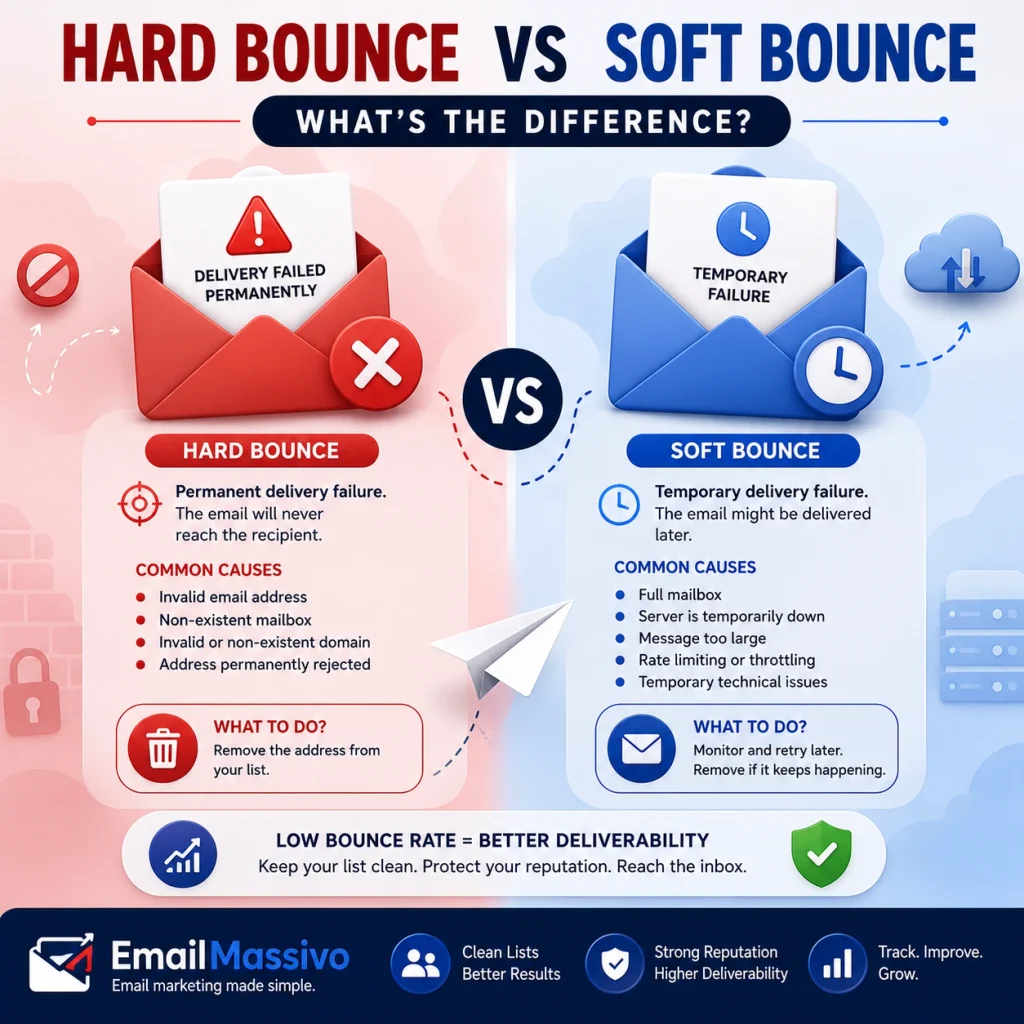
A bounce happens when the recipient’s mail system cannot deliver an email. In email marketing, bounces matter because they can indicate problems with list quality, sending practices, or the receiving mail system.
The two main categories commonly used in email marketing are hard bounces and soft bounces.
A hard bounce generally describes a permanent delivery failure. A soft bounce generally describes a temporary delivery failure. The distinction matters because permanently invalid addresses should normally be suppressed from future campaigns, while temporary failures may be retried or monitored.
Managing bounces correctly helps maintain a clean contact list and protects your sender reputation and overall email deliverability.
Quick answer
A hard bounce means the recipient’s mail system cannot deliver an email because of a permanent problem, such as a non-existent mailbox or invalid domain.
A soft bounce means delivery failed temporarily. Possible causes include a temporary server problem, rate limiting, a full mailbox, or another condition that may disappear later.
In email marketing, marketers should normally remove or suppress addresses that produce permanent failures. They should monitor temporary failures and investigate repeated failures before continuing to send.
Hard bounce vs soft bounce at a glance
| Bounce type | Meaning | Common causes | What to do |
|---|---|---|---|
| Hard bounce | Permanent delivery failure | Invalid address, non-existent mailbox, invalid domain | Remove the address from future campaigns |
| Soft bounce | Temporary delivery failure | Full mailbox, temporary server issue, rate limit, message too large | Retry or monitor before removing |
| Bounce rate | Percentage of emails that fail delivery | Poor list quality, old contacts, technical issues | Track after every campaign |
The basic distinction reflects how SMTP itself handles delivery responses: 4xx response codes indicate temporary conditions, while 5xx codes indicate permanent failures. However, marketers should examine the actual server response rather than relying only on the broad hard/soft label.
RFC 5321 defines the technical basis for this distinction.
What is an email bounce?
An email bounce is a delivery failure. The sending system sends the message toward the recipient’s mail system, but that system cannot deliver it successfully.
Bounces happen for different reasons. Some failures are permanent, such as sending to a mailbox that no longer exists. Others are temporary, such as the receiving server temporarily limiting incoming traffic.
For email marketers, bounces are more than technical errors. They can reveal problems with list hygiene, acquisition methods, sending volume, infrastructure, or sender reputation.
Google, for example, reports both rejected messages and temporary delivery failures in its Postmaster Tools delivery-error reporting.
What is a hard bounce?
Email marketers generally use the term hard bounce to describe a permanent delivery failure.
It usually indicates that retrying the same message later is unlikely to solve the problem.
Common causes include:
- the recipient mailbox does not exist;
- the email domain does not exist;
- the address is no longer active;
- the receiving system permanently rejects the message;
- a permanent policy or technical condition prevents delivery.
In SMTP terminology, 5xx responses generally indicate permanent failures.
What should you do with hard bounces?
Marketers should normally suppress addresses that generate confirmed permanent failures from future email marketing campaigns.
Continuing to send repeatedly to addresses that cannot receive mail creates unnecessary delivery failures and indicates poor list maintenance.
Google specifically recommends automatically unsubscribing recipients who have multiple bounced messages as part of its sending practices for email campaigns.
One hard bounce does not mean your entire list is unhealthy. But a sudden increase in permanent failures should trigger an investigation.
Check:
- where the contacts came from;
- how old the list is;
- whether addresses were entered manually;
- whether a recent list was imported;
- whether the failures are concentrated on one domain;
- what SMTP response codes were returned.
What is a soft bounce?
Email marketers generally use the term soft bounce to describe a temporary delivery failure.
The mailbox or domain may still be valid, but the receiving system cannot accept the message at that particular moment.
Possible causes include:
- a temporary server problem;
- temporary rate limiting;
- temporary filtering;
- a mailbox that cannot currently accept the message;
- a message or attachment problem;
- temporary routing or infrastructure issues.
In SMTP terminology, 4xx responses generally indicate temporary conditions. The sender may attempt delivery again later rather than immediately treating the address as permanently invalid.
What should you do with soft bounces?
A single temporary failure does not necessarily justify removing a subscriber.
Instead, examine the error and determine whether retrying is appropriate.
Google says temporary failures, or “temp fails,” can slow sending rates. For these failures, Google recommends slowing down and using an exponential-backoff approach rather than continuing to send at the same rate.
Marketers should not ignore repeated soft bounces.
If an address repeatedly fails across multiple attempts or campaigns, investigate whether it should remain active in the list.
Why bounce rate matters for email deliverability
Bounce rate is the percentage of attempted email deliveries that fail.
A rising bounce rate can reveal:
- an aging contact database;
- invalid addresses;
- poor acquisition practices;
- problems after a list import;
- infrastructure issues;
- reputation problems;
- excessive sending rates.
It is therefore useful to monitor bounce trends rather than looking at a single campaign in isolation.
Bounce rate also affects the broader issue of deliverability.
For the complete explanation, see our guide to What Is Email Deliverability? Definition, Key Factors and How It Works.
Bounce rate and sender reputation
Sender reputation is the trust profile mailbox providers associate with the domains and IP addresses used to send email.
Google explicitly describes reputation as a quality rating for sending domains and IP addresses and states that sending behavior influences that reputation. Higher-reputation senders are more likely to have messages delivered to Gmail’s inbox rather than spam.
Do not consider delivery failures separately from reputation.
A sender repeatedly generating failures may need to investigate list quality, sending rate, authentication, infrastructure, or recipient behavior.
We explain this relationship in more detail in What Is Sender Reputation in Email Marketing?.
Common causes of hard bounces
Non-existent mailbox
The domain exists, but the specific recipient address does not.
This frequently happens when employees leave companies, accounts are deleted, or an address was entered incorrectly.
Non-existent domain
The recipient domain itself may no longer exist or may not be configured to receive email.
Old lists are particularly vulnerable to this problem because companies close, domains expire, and email infrastructure changes.
Incorrect email address
A contact may enter the wrong address during registration.
For example:
john@gmial.com
instead of:
john@gmail.com
Address validation at signup can reduce these errors.
Permanent rejection
A receiving server may permanently reject a message because of policy, reputation, authentication, or another technical reason.
This is why the actual SMTP response matters. Not every permanent rejection means the recipient address itself is invalid.
Common causes of soft bounces
Temporary server problem
The recipient’s mail server may temporarily be unavailable or unable to process the message.
Rate limiting
A receiving provider may temporarily slow or defer your traffic.
Google states that suspiciously high sending rates can trigger temporary rate limits and recommends maintaining a consistent sending rate.
Mailbox-related temporary problems
A mailbox may temporarily be unable to accept another message.
Whether the system retries depends on the actual SMTP response and the sending infrastructure.
Message or attachment problems
A receiving system may reject or defer a message because of its size, attachment type, or other message characteristics.
Google Postmaster Tools, for example, identifies unsupported attachments among its documented delivery-error categories.
How to reduce hard bounces
The best way to reduce permanent failures is to improve list quality before sending.
Use these practices:
- collect contacts through clear opt-in forms;
- validate addresses during signup;
- avoid purchased lists;
- avoid scraped email addresses;
- review old databases before reactivating them;
- suppress confirmed permanent failures;
- monitor the source of newly imported contacts;
- watch for obvious domain typos.
Google recommends sending email only to recipients who want your messages, confirming recipient addresses before subscribing them, and considering removal of recipients who no longer engage.
How to reduce soft bounces
Temporary failures require a different approach.
Useful practices include:
- keep sending volume consistent;
- avoid sudden volume spikes;
- monitor repeated temporary failures;
- investigate failures by mailbox provider;
- keep messages and attachments within reasonable limits;
- review server responses;
- use appropriate retry logic;
- investigate reputation or authentication problems.
Do not automatically treat every temporary failure as an invalid email address.
The reason for the failure matters.
How many bounces are too many?
There is no single universal bounce-rate threshold that defines a healthy email program for every sender.
Different lists, industries, mailbox providers, acquisition methods, and sending environments produce different results.
Treat arbitrary claims such as “anything below X% is always safe” with caution.
A better approach is to establish your normal baseline and investigate meaningful increases.
If bounce rate suddenly rises, examine:
- list age;
- list source;
- recent imports;
- permanent vs temporary failures;
- individual mailbox providers;
- changes in sending volume;
- authentication;
- domain or IP reputation;
- changes in infrastructure.
The trend and the underlying error codes are more informative than one isolated percentage.
What to check after a campaign with many bounces
If a campaign generates an unusual number of delivery failures, ask:
- Was the list old?
- Was it recently imported?
- Did recipients explicitly subscribe?
- Are the failures permanent or temporary?
- Are failures concentrated at Gmail, Outlook, Yahoo, or another provider?
- Did sending volume increase suddenly?
- Were there recent DNS changes?
- Is the sending domain correctly authenticated?
- Did your sending IP or domain reputation change?
- What do the SMTP responses actually say?
For Gmail traffic, Google Postmaster Tools can provide information about domain and IP reputation, authentication, spam rate, and delivery errors for eligible senders.
Google’s documentation explains the available Postmaster Tools dashboards in detail.
Authentication and email bounces
SPF, DKIM, and DMARC do not prevent invalid email addresses from bouncing.
They solve a different problem: authentication helps receiving systems verify that a message is legitimately associated with the sending domain.
However, authentication problems can contribute to rejected messages.
Google currently requires SPF or DKIM for all senders to personal Gmail accounts. Senders delivering more than 5,000 messages per day to Gmail accounts must meet additional requirements, including SPF, DKIM, and DMARC.
For a detailed explanation, see SPF, DKIM and DMARC Explained for Email Marketing.
How EmailMassivo fits into bounce management
An email marketing platform provides the infrastructure for managing contacts, sending campaigns, and reviewing campaign results.
EmailMassivo can be part of that workflow, but keeping bounce rates under control also depends on how the sender builds and maintains the contact database.
Good bounce management requires:
- permission-based contacts;
- clean contact data;
- suppression of invalid addresses;
- correctly authenticated sending domains;
- responsible sending volume;
- regular review of campaign results.
The platform is one part of the deliverability system. List quality and sender behavior remain important.
Bounce management checklist
Before sending your next campaign, check:
- Is the list permission-based?
- Were known invalid addresses removed?
- Has the list been used recently?
- Were old contacts reviewed?
- Is the sending domain authenticated?
- Is the sending volume normal for this domain?
- Are permanent failures suppressed?
- Are repeated temporary failures monitored?
- Are SMTP responses being reviewed?
- Are delivery trends checked after campaigns?
This is also part of the broader process described in How to Improve Email Deliverability: Practical Checklist.
Hard bounce vs soft bounce: practical example
Suppose you send a campaign to 10,000 subscribers.
One recipient left a company six months ago and the company deleted the mailbox. The receiving mail server returns a permanent failure. Marketers should normally suppress that address.
Another recipient has a valid mailbox, but the receiving provider temporarily limits your traffic. The server returns a temporary failure. Your sending infrastructure may retry the message later.
Both messages failed on the first attempt, but you should not necessarily handle them the same way.
That is the practical difference between a hard bounce and a soft bounce.
Why old email lists often produce more bounces
Email databases naturally decay over time.
People:
- change jobs;
- abandon old accounts;
- change email providers;
- close businesses;
- lose access to domains;
- delete mailboxes.
A list that performed well two years ago may therefore contain addresses that are no longer deliverable today.
Sending immediately to a large dormant list can create unnecessary delivery failures and reputation risk.
Before reactivating an old list, review its origin, permission status, age, previous engagement, and known delivery history.
Can bounces cause emails to go to spam?
Bounces and spam placement are different outcomes, but both may signal a weak email program.
A high number of delivery failures may indicate poor list quality or sending practices. These same problems can also contribute to reputation issues.
Google’s Postmaster Tools specifically reports delivery errors alongside domain reputation, IP reputation, authentication, and spam rate, making it useful to examine these signals together rather than independently.
If receiving systems accept your campaigns but place them in spam, see Why Are My Emails Going to Spam? Common Causes and How to Fix Them.
Frequently Asked Questions
These FAQs cover the most common questions about hard bounces, soft bounces, and bounce management.
Hard bounce and soft bounce FAQs
Hard bounce questions
A hard bounce is a permanent email delivery failure. Retrying the same address usually will not solve the problem, although marketers should always review the actual SMTP response to determine the specific cause.
A soft bounce is a temporary delivery failure. It can occur because of temporary server problems, rate limiting, mailbox conditions, filtering, or other issues that may disappear later.
Marketers should normally suppress confirmed permanent failures from future campaigns. Repeatedly sending to addresses that cannot receive email creates unnecessary delivery failures.
Not necessarily after the first failure. Marketers should monitor temporary failures. Repeated failures may justify suppressing the address depending on the SMTP response and your list-management policy.
A pattern of excessive delivery failures can indicate list-quality, reputation, infrastructure, or sending problems. These issues can also negatively affect overall deliverability.
Email addresses change over time. Mailboxes are deleted, employees change jobs, domains expire, and users abandon accounts. Older lists therefore tend to accumulate addresses that are no longer deliverable.
SMTP 5xx responses represent permanent negative completion replies. However, marketers should still inspect the complete response because a permanent rejection does not necessarily mean that the recipient address itself is invalid.
SMTP 4xx responses represent temporary negative completion replies. Delivery can generally be retried later, but repeated temporary failures should still be investigated.
They do not fix invalid recipient addresses. However, proper authentication can prevent some delivery failures associated with sender authentication and policy requirements.
Start with the age and source of the list, recent imports, permanent versus temporary failures, SMTP response codes, sending volume, authentication status, and whether failures are concentrated at a particular mailbox provider.
Key takeaways
A hard bounce generally represents a permanent delivery failure. A soft bounce generally represents a temporary delivery failure.
Marketers should normally suppress confirmed permanent failures from future campaigns. They should monitor temporary failures and retry them only when appropriate.
Do not evaluate bounces only as a percentage. Examine the actual SMTP response, whether the failure is temporary or permanent, which mailbox providers are affected, and whether the problem coincides with changes in list quality, sending volume, authentication, or reputation.
The most effective long-term strategy is straightforward: maintain permission-based lists, remove invalid contacts, authenticate your sending domain, keep sending behavior consistent, and monitor delivery errors after every campaign.
Sources
Google — Email sender guidelines – Google’s official requirements and recommendations for sending email to personal Gmail accounts, including authentication, spam-rate, DNS, TLS and bulk-sender requirements.
Google — Postmaster Tools dashboards – Official documentation covering delivery errors, temporary failures, domain reputation, IP reputation, authentication and spam-rate monitoring.
IETF — RFC 5321: Simple Mail Transfer Protocol – The underlying SMTP standard defining temporary 4xx and permanent 5xx server responses.