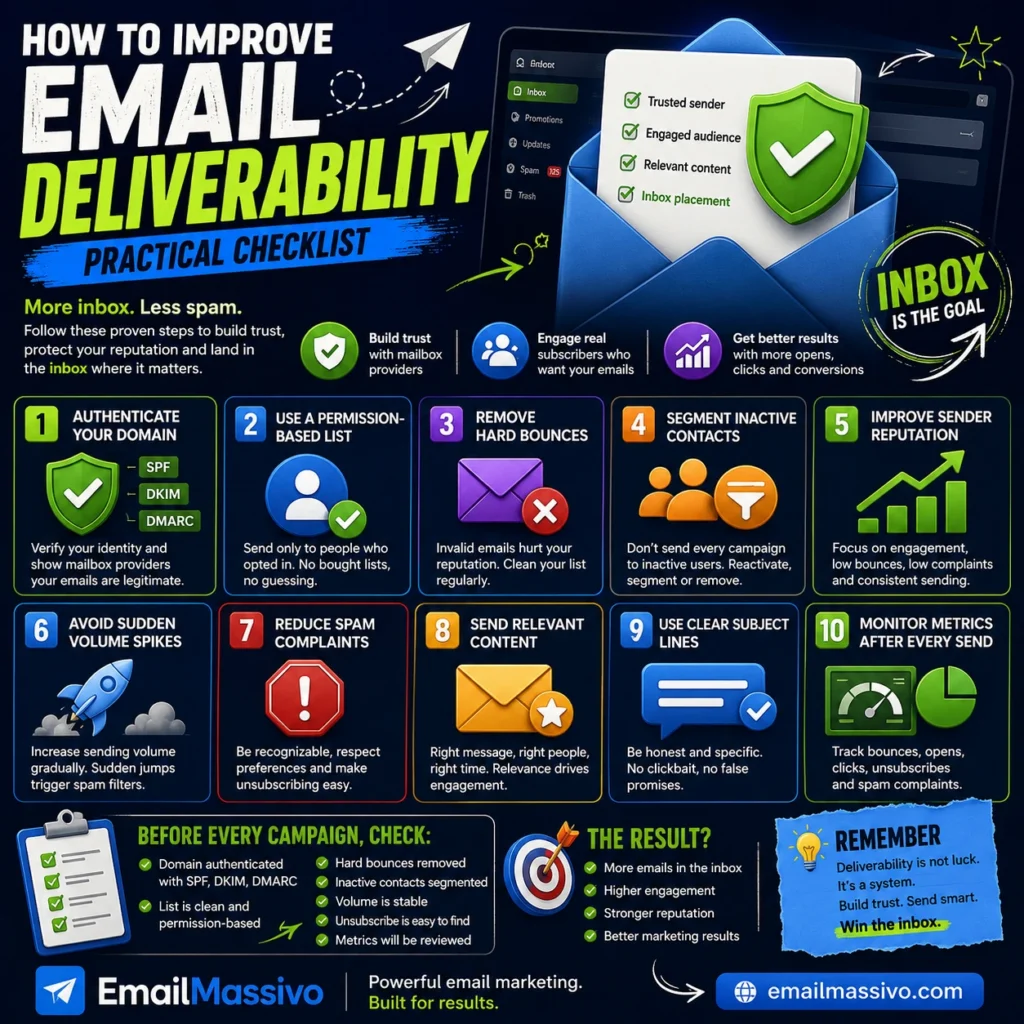
Email deliverability is the ability of your emails to reach recipients’ inboxes instead of being blocked, rejected, or sent to spam. Improving deliverability means building trust with mailbox providers and sending messages that recipients expect, recognize, and want to receive.
For email marketing, deliverability is not a single setting. It is the result of several factors working together: domain authentication, sender reputation, contact list quality, engagement, bounce management, spam complaint control, sending consistency, and content quality.
A strong deliverability strategy starts before the campaign is sent. It begins with a properly authenticated domain, a clean list, a clear sender identity, relevant content, and a controlled sending pattern.
Quick answer
To improve email deliverability, authenticate your sending domain with SPF, DKIM, and DMARC, send only to permission-based contacts, remove invalid addresses, segment inactive users, avoid sudden sending spikes, reduce spam complaints, and monitor campaign metrics after every send.
Good deliverability comes from trust. Mailbox providers are more likely to place your emails in the inbox when your domain is authenticated, your sender reputation is healthy, your list is clean, and recipients interact positively with your messages.
What does improving email deliverability mean?
Improving email deliverability means increasing the chance that your emails reach the inbox rather than spam, junk, quarantine, or rejection.
It does not mean simply sending more emails. It means sending better emails to the right people, from a trusted domain, through properly configured infrastructure, with content that matches recipient expectations.
A campaign can be delivered to a mail server and still have poor deliverability if many messages land in spam. Deliverability focuses on final placement, not only technical acceptance.
For a broader definition, see the guide on what email deliverability means.
Email deliverability checklist
| Action | Why it matters | What to check |
|---|---|---|
| Authenticate your domain | Helps mailbox providers verify sender identity. | SPF, DKIM, and DMARC are configured correctly. |
| Use permission-based contacts | Reduces complaints and low engagement. | Contacts agreed to receive your emails. |
| Remove hard bounces | Protects sender reputation. | Invalid addresses are removed after failure. |
| Segment inactive contacts | Prevents weak engagement signals. | Long-term inactive users are separated. |
| Monitor sender reputation | Helps detect trust problems early. | Bounces, complaints, opens, clicks, and volume changes. |
| Avoid sudden volume spikes | Sudden increases can look suspicious. | Sending volume grows gradually. |
| Reduce spam complaints | Complaints are a strong negative signal. | Sender identity, consent, frequency, and unsubscribe process. |
| Send relevant content | Engagement improves when content matches user expectations. | Subject, audience, timing, and message value. |
| Use clear subject lines | Misleading subjects can cause complaints. | The subject accurately reflects the message. |
| Review metrics after every send | Deliverability changes over time. | Bounces, complaints, unsubscribes, opens, clicks, and engagement trends. |
1. Authenticate your sending domain
Domain authentication is one of the first technical steps in improving email deliverability. It helps mailbox providers confirm that your emails are authorized to come from your domain.
The three core authentication methods are SPF, DKIM, and DMARC.
SPF defines which servers can send email for your domain. DKIM adds a digital signature to outgoing messages. DMARC tells mailbox providers what to do when authentication checks fail.
Authentication does not guarantee inbox placement, but missing or incorrect authentication can make your emails look less trustworthy.
What to check
Check that SPF, DKIM, and DMARC are configured for the domain or subdomain used to send campaigns. If you send from mail.example.com, authenticate that sending subdomain, not only the root domain.
If you use an email marketing platform, make sure the platform is authorized to send on behalf of your domain. For more detail, see the guide to SPF, DKIM, and DMARC.
2. Use a permission-based email list
A permission-based list contains people who agreed to receive your emails. This is one of the strongest foundations of deliverability.
Sending to people who did not opt in increases the risk of spam complaints, unsubscribes, low engagement, and poor sender reputation.
Purchased, scraped, or rented lists are especially risky because recipients may not recognize your brand and may not expect your message.
What to check
Before sending, confirm that your contacts gave clear permission. Avoid sending regular campaigns to imported, old, or unverified lists without reviewing them first.
A smaller engaged list is usually better for deliverability than a large list filled with inactive or non-permission contacts.
3. Remove hard bounces
A hard bounce is a permanent delivery failure. It usually means the email address is invalid, does not exist, or cannot receive mail.
High hard bounce rates can damage sender reputation because they suggest that your list is outdated or poorly collected.
Mailbox providers may treat repeated sending to invalid addresses as a sign of low-quality email practices.
What to check
Remove hard bounces from your list after they occur. Do not keep sending campaigns to addresses that permanently fail.
If a list has not been used for a long time, clean it before sending a full campaign. Old lists often contain abandoned or invalid addresses.
4. Segment inactive contacts
Inactive contacts are subscribers who have not opened, clicked, or interacted with your emails for a long period.
Sending every campaign to inactive users can reduce engagement rates and weaken sender reputation over time.
Low engagement tells mailbox providers that recipients may not find your emails useful or wanted.
What to check
Create a segment for inactive contacts. Send them fewer campaigns or use a reactivation sequence before removing them from regular sends.
Do not treat all contacts equally. Engaged subscribers and inactive subscribers should not always receive the same frequency or content.
5. Improve sender reputation
Sender reputation is the trust profile associated with your sending domain, IP address, or both.
Mailbox providers build this reputation based on your sending behavior and recipient reactions. Good reputation comes from consistent sending, low bounce rates, low complaint rates, clean lists, and healthy engagement.
Poor reputation can cause emails to land in spam even when the message content looks normal.
What to check
Monitor your bounce rate, spam complaint rate, unsubscribe rate, open rate, click rate, and volume changes.
If performance drops suddenly, do not increase sending volume. Identify the cause first. Reputation problems usually improve through consistent, better sending behavior over time.
6. Avoid sudden sending volume spikes
Mailbox providers look at sending patterns. A sudden increase in volume can look suspicious, especially if your domain is new, inactive, or has little previous sending history.
For example, if a domain usually sends a few hundred emails and suddenly sends tens of thousands, filtering risk can increase.
What to check
Increase volume gradually. Start with your most engaged contacts and expand only when results are healthy.
If you are moving to a new platform, warming up a domain, or restarting campaigns after a long pause, avoid sending to the full list immediately.
7. Reduce spam complaints
A spam complaint happens when a recipient marks your message as spam or junk. Complaints are one of the strongest negative signals in email deliverability.
Recipients often complain when they do not recognize the sender, did not expect the email, receive too many messages, cannot easily unsubscribe, or feel misled by the subject line.
Even a small number of complaints can hurt deliverability if your volume is low or your reputation is already weak.
What to check
Use a recognizable sender name. Make it clear why the recipient is receiving the email. Avoid misleading subject lines. Keep the unsubscribe option visible and simple.
It is better for an uninterested user to unsubscribe than to mark your message as spam.
8. Send relevant content
Relevance is a major part of engagement. People are more likely to open, click, and trust emails that match their interests, needs, or previous actions.
Generic campaigns sent to everyone can perform poorly because different contacts may expect different messages.
Better segmentation usually leads to better engagement, and better engagement can support stronger deliverability.
What to check
Segment your audience by interest, behavior, location, purchase history, lifecycle stage, or engagement level.
Before sending, ask whether the message is useful for that specific audience. A campaign should have a clear reason to exist.
9. Use clear subject lines
The subject line sets recipient expectations. If the subject line is misleading, exaggerated, or unrelated to the content, users may ignore the message, unsubscribe, or mark it as spam.
Subject lines do not need to be boring, but they should be accurate.
What to check
Make sure the subject line matches the content of the email. Avoid excessive capitalization, too many punctuation marks, unrealistic claims, or fake urgency.
A clear subject line helps attract the right attention from the right recipients.
10. Monitor campaign metrics after every send
Deliverability changes over time. A campaign that performs well today can perform worse later if list quality declines, complaints increase, or engagement drops.
Monitoring helps detect early warning signs before a deliverability problem becomes serious.
What to check
Review these metrics after every campaign:
- delivery rate;
- hard bounce rate;
- soft bounce rate;
- open rate;
- click rate;
- unsubscribe rate;
- spam complaint rate;
- engagement by segment;
- performance by mailbox provider when available.
Do not evaluate deliverability from one metric alone. A drop in open rate should be reviewed together with bounces, complaints, list changes, content, and sending volume.
What to check before every campaign
Before sending an email marketing campaign, review this short checklist:
- Is the sending domain authenticated?
- Is the sender name recognizable?
- Is the list permission-based?
- Were hard bounces removed?
- Are inactive contacts segmented?
- Does the subject line match the content?
- Are the links trustworthy?
- Is the unsubscribe option easy to find?
- Is the sending volume reasonable?
- Will campaign metrics be reviewed after sending?
This checklist helps reduce avoidable deliverability risks before they affect inbox placement.
How EmailMassivo fits into the process
An email marketing platform can help organize campaigns, manage contacts, send messages, and track results.
A platform such as EmailMassivo can support the campaign workflow, but deliverability also depends on the sender’s domain setup, list quality, content, and sending behavior.
The platform is one part of the deliverability system. The sender still needs a properly authenticated domain, permission-based contacts, relevant campaigns, and consistent monitoring.
Common mistakes that hurt deliverability
Many deliverability problems come from avoidable mistakes.
Common mistakes include:
- sending from an unauthenticated domain;
- using old or purchased lists;
- ignoring hard bounces;
- sending every campaign to inactive contacts;
- increasing volume too quickly;
- hiding the unsubscribe link;
- using misleading subject lines;
- sending image-only emails;
- ignoring spam complaints;
- changing sender identity too often.
Improving deliverability usually means fixing several weak points, not one isolated issue.
FAQ
Start with the basics: authenticate your domain, remove hard bounces, send only to permission-based contacts, and reduce spam complaints. These areas are often the most important first checks.
No. SPF, DKIM, and DMARC help mailbox providers verify sender identity, but inbox placement also depends on reputation, engagement, list quality, complaints, bounces, content, and sending behavior.
Yes. A clean list reduces hard bounces, spam complaints, and low engagement. List quality is one of the strongest practical factors in email deliverability.
In many cases, long-term inactive subscribers should be segmented first. You can send a reactivation campaign, reduce frequency, or remove them from regular campaigns if they still do not engage.
Authentication is only one part of deliverability. Emails can still go to spam because of poor sender reputation, low engagement, spam complaints, invalid contacts, suspicious content, or sudden sending spikes.
You should review key metrics after every campaign. Deliverability is an ongoing process, not a one-time setup.
No single metric tells the full story. Bounce rate, spam complaints, engagement, unsubscribes, delivery rate, and sending volume should be reviewed together.
Changing platforms may help if there were technical issues, but it will not automatically fix poor list quality, weak consent, bad content, or damaged sender reputation.
Key takeaways
Improving email deliverability means increasing the chance that your emails reach the inbox instead of spam, rejection, or quarantine.
The most important steps are domain authentication, clean and permission-based lists, bounce management, active segmentation, consistent sending volume, low complaint rates, relevant content, and regular metric review.
Deliverability is not a one-time task. It is an ongoing process that combines technical setup, responsible sending, audience quality, and campaign performance monitoring.
For email marketing, better deliverability starts with trust: trusted domain, trusted sender identity, trusted list practices, and trusted content.